SOS Luggage Tag with QR/NFC
search
  • SOS Luggage Tag with QR/NFC
  • SOS Luggage Tag with QR/NFC
  • SOS Luggage Tag with QR/NFC
  • SOS Luggage Tag with QR/NFC

SOS Luggage Tag with QR/NFC

€15.66

Smart luggage tag with QR code and NFC chip – because every bag deserves to find its way back to you.

Whether lost on a journey or delayed in transit – this smart tag enables instant identification and remote updating of your preferred delivery address – anytime and from anywhere using your smartphone.

check   Display and direct selection of your emergency contacts

check   Finder can send their location to you via smartphone

check   Define and display drop-off location with Google Maps support

check   Digital message board for sending photos or text messages

check   NFC chip adds extra safety if the QR code is damaged

check   No monthly fees / No app required

check   Secure data storage in Switzerland

Digital SOS luggage tags make traveling safer and smarter.

Quantity
Available

  Personal local support

We speak english

  Free delivery

from € 50,00 order value

  30 day return policy

If you don't like something

Description

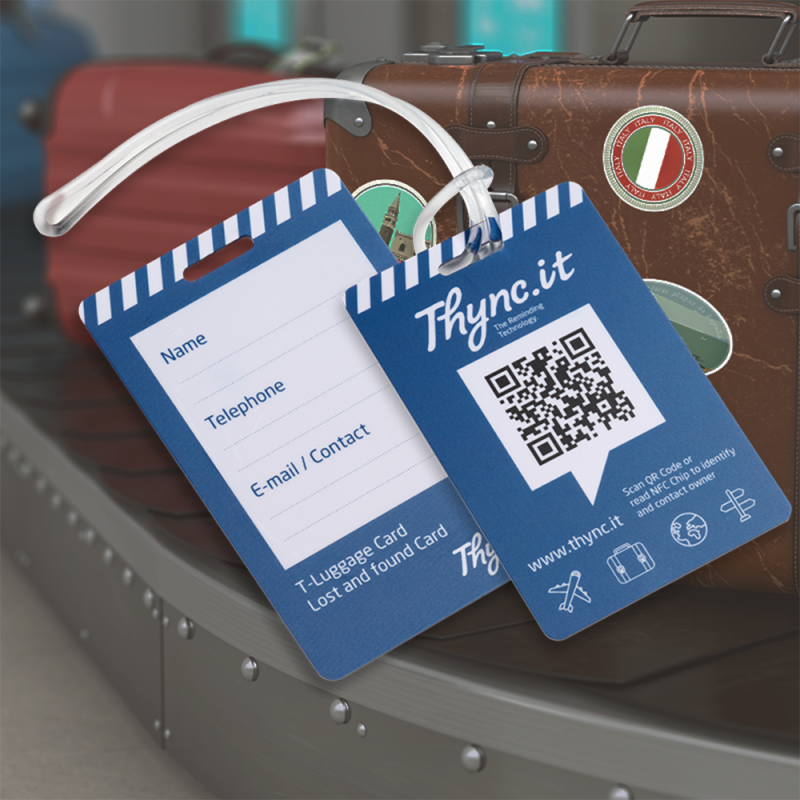
Label all your luggage with the durable luggage tag and make it easier for the finder or delivery service to contact you. In case of loss, the finder (e.g. delivery service) can easily identify your luggage via the QR code or the integrated NFC chip and get in touch with you directly. In addition, you can have your preferred delivery address displayed on the luggage tag using Google Maps – ideal when facing language barriers or if you don't want to be disturbed.

Double security: The integrated NFC chip ensures identification even if the QR code is heavily scratched and cannot be read with a smartphone camera.

You don't know the exact hotel address? Thanks to the Google Maps integration, you can simply enter the hotel name and city – Google automatically finds the correct address and displays it clearly in Google Maps.

Thanks to the integrated bulletin board, you can also upload photos of your luggage. This further improves recognition and identification and is strongly recommended by delivery services and Lost & Found service desks.

You decide which information and contact details are shown when the QR code is scanned.

All data can be updated at any time and remotely via a web browser using your smartphone, tablet, or desktop – no physical access to the QR code and no additional app required. Even after the luggage has been lost, you can conveniently update your location details (e.g. hotel address) remotely on your luggage tag, or adjust them again if you continue your journey.

IMPORTANT: An active internet connection is required to access the data and contact information.

Fuctions

Applications

Webapp

The web app is displayed directly in the smartphone's browser after scanning the QR code – no additional app needs to be installed. All functions and contact information can be accessed easily and conveniently via the web app.

Test me

Explore the features live on your smartphone.
Simply scan the QR code or use the button below.

Instruction Manual

The online user manual and FAQs for the luggage tags with QR code can be accessed at any time directly via the main menu of the web app.

Alternatively, the user manual can also be accessed via the button below:

Recommentation: Installation on Smartphones

Make it easier to access your data without having to scan the QR code every time and save your QR code directly on your smartphone.

Android: smartphone & tablet (Chrome browser)

Select Add to home screen ‘Add to Home screen’ from the browser menu. Enter a custom name and complete the process by tapping ‘Add’. An icon will be created on your home screen. Similar to a native app, you can now access your QR code online at any time with a single tap.

Apple: iPhone & iPad (Safari browser)

In the browser menu next to the address bar, tap the icon with the upward arrow and select ‘Add to Home Screen’. You can then choose a suitable name and finish the process by tapping ‘Add’. This will install a shortcut icon on your home screen.

Cleaning and Maintenance

Protect the printed or engraved QR code from mechanical impacts such as knocks, scratches, or abrasion. Avoid contact with chemical substances and prolonged exposure to strong sunlight. If necessary, the item can be cleaned using lukewarm water, mild soap, and a soft brush with light pressure.

Not suitable for machine washing.

If the QR code should nevertheless become unreadable, no data will be lost! All information is securely stored in a Swiss data center and can be reconnected to a new DynaTag product at any time. In addition, the data can always be accessed and updated in your DynaTag or Thync.it customer account.

Product & Application Video

Currently, there is no specific video available for the luggage tags with QR Code.

Instead, you can watch a video about the overarching product family “Personal Products” from DynaTag.

Accessories & Spare Parts

We offer the following accessories or spare parts for the SOS luggage tags:

Frequently Asked Questions FAQ

For more information, visit our blog or follow us on social media.

Why should I use a Dynatag luggage tag?

It helps to quickly identify your luggage and increases the chance that lost items will be returned to you. You can save different contact details, delivery locations (via Google Maps) and preferred languages ​​for contact.

No, there is no special app needed. All functionality works via a web browser on a smartphone, tablet or computer.

As soon as someone scans the QR code or visits the web address, you will immediately receive an automatic email notification that your tag has been viewed. If the finder gives permission, the location of the scan will also be sent.

No, there are no monthly subscription fees. The one-time purchase of the label includes a lifetime service.

Yes! With your purchase, you’ll receive free access to your personal user account (created during activation). From there, you can update information remotely at any time, upload new images, or modify existing details—easily from your smartphone, tablet, or computer.

You can save various contact details, multiple phone numbers, email address, WhatsApp information, and even a preferred delivery location via Google Maps. You decide which information is visible.

Product Reviews

Comments (0)
No customer reviews for the moment.

Personalized customer support

Shop Info

Personal service.

We are always here for you. Do you have any questions or would you like personal advice about our products or your order? We respond quickly, reliably, and individually.

All products are shipped directly from our own warehouse located in the Netherlands – no imports, no drop shipping.

Contact form

Correspondence address

DynaTag Europe VOF

Ganzeweide 48A

6413 GG Heerlen

The Nertherlands

Return address

DynaTag Europe VOF

Ganzeweide 48A

6413 GG Heerlen

The Netherlands

Business hours

9:00 AM – 6:00 PM (Monday to Friday), (GMT+01:00) Central European Time (Amsterdam)

TPCA-0001A1
100 Items

Data sheet

Material
PVC – Polyvinyl chloride
Storage Capacity
10MB
Storage Time
5 Years
NFC chip
Yes
WebApp-Version
SOSluggage
Brand
Thync.it
Article number / SKU
TPCA-0001A1
EAN Code
4270000462436

Specific References

EAN13
4270000462436